What Is a Website Concept? How Planning Works in 7 Steps
Author: Matthias Wimmer · Published: October 9, 2025 · Updated: July 21, 2026
7 Steps to Developing a Website Concept
A website concept defines your website’s objectives, the content it needs, and its structure before design and development begin.
This guide explains, step by step, what makes for a good website concept and how to go about creating one.
A solid design concept is the foundation for a user-friendly website, a prerequisite for custom web design, and the basis for successful search engine optimization.
This also forms the basis for determining how much a website costs. In addition, a well-thought-out design ensures that your website is consistently integrated into your corporate identity, both online and offline.
This guide provides step-by-step instructions on how to proceed. If you’d like to submit the design concept, we’d be happy to create your website concept.

Contents
Successful Websites from the Start – A Good Website Must Be Well Planned.
With a strategically planned website
- Reach your target audience and meet your users’ expectations,
- promote your content and showcase your brand,
- turn your website visitors into customers.
The following questions should be answered first:
What should be communicated to whom, how, and why, and what should happen as a result?
With these answers, the basic framework of the website concept – and, in principle, of all communication efforts – can already be outlined.
In the field of website development, the questions “What is the user looking for?” and “What are the user’s goals on the website?” are also central to the analysis.
A clear structure, unambiguous communication channels, reliable points of contact, and good collaboration between the client and the agency are crucial for successful planning and implementation.
1. Defining the Website’s Objectives
First, the objectives of the new or redesigned website should be clearly defined. In other words, what exactly is the website intended to achieve?
Is it intended to promote or sell products (online store), showcase a company and its services (corporate website), recruit new employees (career website), or present a specific topic in a search engine-optimized manner (microsite/landing page)?


The most common goals for creating or relaunching a website:
Brand Image/Perception
The goal is to raise the company’s profile and increase its visibility on the Internet. The aim is to boost brand awareness and promote the company’s values, as well as its products and/or services, to as broad an audience as possible.
Revenue Growth
The website is designed to increase the company’s revenue and, consequently, its profits. The goal is to drive product sales and encourage customers to use the company’s services.
Automation
A wide variety of processes – including those from the offline sector – can be implemented online quickly and cost-effectively. This saves time and resources, for example, by reducing the workload on the support department.
Presentation
A website allows for the up-to-date and comprehensive presentation of products and services. The presentation can be continuously optimized using videos, photos, and graphics. Costly catalogs or expensive retail space are no longer necessary.
Lead Generation
The website serves to collect contact information. This can be done, for example, through newsletter sign-ups, contests, or by offering the opportunity to download e-books or white papers in exchange for an email address. The collected contact information can then be used, for example, for advertising campaigns.
New Customer Acquisition
The website is designed to attract new customers for products or services and expand the customer base. This means that website visitors should become prospects and, ideally, customers.
Customer Loyalty
The website not only addresses customers’ challenges but also offers extensive added value in the form of content, such as text, images, videos, etc. Customers have the opportunity to contact the company directly, fostering a positive and lasting relationship.
Information
The website is designed to provide users with up-to-date information and to communicate limited-time promotions or upcoming events. The use of social media channels should always be considered in this context.
Recruiting
A well-designed careers website helps attract qualified employees and simplifies and speeds up the application process. Furthermore, the company can position itself as an attractive employer and highlight special benefits and offers for potential employees.
Marketing
The goal of marketing advertising space on the website is to generate profit. While admittedly not relevant for all websites, this objective should be mentioned here for the sake of completeness.
2. Identify and Define Technical Features
A website’s objectives provide insight into the features (specific functions) it needs. So what technical elements does the website need to best achieve its objectives?
There are numerous tools available in this area, and the right features should be selected through discussion among all parties involved (client, agency, and developers).
- A fast and straightforward ordering process makes it easier to make a purchase.
- Credible recommendations and trustworthy reviews can boost sales.
- Comment systems allow for audience engagement.
- Social media channels expand opportunities for interaction and offer quick response times.
- Testimonials build credibility and enhance your image.
- Newsletters are a great way to share the latest information and keep people informed about new products, promotions, and events.
3. Develop Content
Based on the website’s established goals, we can now determine the content that is needed.
What information is relevant to the user? What does the company want to communicate, and what should it avoid communicating? How can the company’s offerings be best described? What visual elements – such as graphics, photos, videos, etc. – can also be used to support this?
What is needed to present a topic, product, or service in a way that is relevant to the user? How much detail should the information provide?
The compilation of topics and content should generally be carried out within the company – with support from the agency. Depending on the nature and scope of the planned website, this process can take days, weeks, or even months.
It is important to have a reliable team on the company side that can generate some of the content itself or request it from the specialized departments and involve the sales and marketing departments.
It also makes sense to periodically review the collected content throughout the process to ensure its relevance and clarity.
Avoid presenting the information solely from the company’s perspective. Don’t overlook the users’ goals.
Personas – A Useful Tool in Website Development
A good way to generate content is to use so-called personas. These describe typical customer groups from a somewhat subjective perspective. In addition to personal data (name, age, gender, marital status, etc.), they focus particularly on the desires, expectations, problems, and needs of these representative figures.

Personas thus provide insight into which topics and content are relevant and helpful for meeting the needs of each persona, as well as which user interface elements are necessary for optimal user guidance.
4. Develop a Structure
When creating the website structure, the collected content is organized into a logical order and given a structured format. The page structure thus reflects the website’s content and functional organization, as well as its navigation structure.
However, the website structure should not necessarily be viewed as a linear process. Users arrive at pages within the structure via search engine queries or external links.
Therefore, the following questions should always be kept in mind: How do users navigate to which pages of the website, and how can the structure support them in solving their problems and achieving their goals?
Even when creating the website structure, it is therefore important to take into account pages that are particularly relevant to search engines.
However, there are a few key elements for creating a website structure, such as the home page, topic pages, “About Us” pages, the contact page, and, of course, the legally required pages such as the legal notice and privacy policy.
At the end of the process, you’ll have what’s called a sitemap. This includes all the essential pages of the entire website. The website structure also serves as the basis for the navigation menu that will be created later, even though not all pages from the structure necessarily need to be included in the menu.
Side note: In addition to the classic Post-it method, there are digital tools available for creating and testing the website structure, such as the Web App Flowmapp, Visio by Microsoft, Draw.io, Omnigraffle (Mac), Miro etc.

5. Determine Page Types
Websites typically consist of a predetermined number of page types. Depending on the purpose of a particular page and its level within the website structure, that page is assigned a specific page type.
Page types are defined by their content and functional elements. Using consistent page types is important for user-friendliness, as clearly structured pages – whose elements are repeated when they serve the same function and whose layout is logical and purposeful – make it easier for users to navigate the website.
The number of page types required and which elements (such as headers, footers, CTAs, etc.) appear on all pages depend on the size and type of the website.
The following page types are the most common:
Home Page
The homepage is the first page of a domain (index.html). The home page is of central importance, as it serves as the starting point for many users when searching for information.
Ideally, the homepage includes brief information about the company, briefly describes the users’ challenges, offers possible solutions or promises of solutions, highlights which customers already trust the company’s products and/or services, and contains a clear call to action (CTA). The content mentioned is formulated concisely, touched upon briefly, and presented clearly. The homepage serves, so to speak, as a springboard into the depths of the website.
Landing Page
These pages are typically accessed via external links. They often cover a single specific topic in depth and are therefore ideal for search engine marketing.
Category Page/Overview Page
These pages provide an overview of specific topic areas. Here, users are offered entry points to explore the content in greater depth.
Content Page
A page with in-depth content. Here, users find further information on a clearly defined topic.
Detail Page
Like the content page, this is a page with in-depth content, such as product pages. These are usually the pages at the end of the information hierarchy.

Fixed and flexible elements are now defined for each page type, depending on the function and purpose of that specific page type. Typically, a range of recurring elements is used for this purpose, such as teaser boxes, image sliders, text boxes, images, list views, video players, contact boxes, CTA elements, etc.
In addition, all page types include global elements, such as headers (navigation elements, search, etc.) and footers (navigation, copyright, contact information, sitemap, etc.), even though these may vary in type and scope depending on the page type.
Wireframes – Schematic Representations of Web Pages

Page types are created as so-called wireframes. Wireframes are rudimentary conceptual designs of a website or a page type. They show, in a very simplified form, the layout and positioning of the individual elements (taking their future function into account) on the corresponding page.
Wireframes are often created digitally and can be navigated like a website on a limited scale in the form of what is known as a “click dummy.” Wireframes can also be used to simulate the behavior of individual elements in the respective responsive view.
6. Web Design – Visual Appeal
Now it’s time for the creative part of the process. The design of the new website is developed. If the company has a corporate design, the guidelines outlined therein are implemented accordingly.
If not, mood boards – which combine graphic elements, fonts, typography, and other layout guidelines – can be used to develop various design concepts. This way, there’s no need to design entire websites; instead, a basic look and feel for the website is developed.
Once a design style has been agreed upon, all elements (teaser boxes, image sliders, text boxes, images, list views, video players, contact boxes, CTA elements, etc.) as well as individual page types are implemented using that design.
Using recurring elements also simplifies the design process and ensures a consistent overall look for the website. (Elements that serve the same function also look the same.)
In this case, it’s advisable to use appropriate tools, such as Adobe XD, which enable quick editing and the creation of clickable design mockups. This allows you to evaluate the design’s impact and functionality, and to test parts of the user journey in advance and optimize them as needed.
Important: During the design phase, responsive layouts for the page types are designed to accommodate as many devices as possible. Depending on the focus, a “mobile-first” approach may be appropriate for the design.
7. Implementation
During implementation/programming, the design is translated into HTML and CSS, which means it is made readable by browsers in the form of code. Larger websites are generally built using content management systems (CMS). These systems allow non-programmers to maintain and update a website after it has been completed.
The implementation involves the following steps:
Setting Up the Development Environment/CMS
A test environment is set up on a server with the appropriate technical capabilities for the selected CMS (e.g., WordPress, Drupal, Magnolia, etc.). The site is built and tested there until launch.
Programming the Required Templates
Here, the designs for the individual page types are created as editable templates.
Building the Website Structure
Once all templates have been created, the website structure can be built.
Implementation of Features
Technical features and functions such as contact forms, newsletter subscriptions, calendar functionality, and similar features are implemented.
User Management
Defining future roles and assigning access rights to editors, administrators, etc., for the subsequent populating and maintenance of the website.
Initial Content Upload
All text is integrated, and graphics, images, videos, etc., are uploaded to the server and formatted—in short, the content is added to the pages.
Testing
The existing pages are tested, and errors (broken links, 404 errors, display errors) are corrected.
(Re-) Launch
For the relaunch of the site, redirects are set up in advance, and the entire website is migrated to the live server. The site goes live. As part of the go-live process, a sitemap is created and submitted to Google for indexing, the site is registered in Search Console, etc. Additionally, further fixes for minor bugs are carried out.
Done. Is that it?
No, this is just the beginning.
After all, a website is never truly finished. You have to add the latest news, feature new topics, add new location pages, or update existing content.
In addition, the CMS needs to be maintained and security updates need to be applied. There’s always something to do when it comes to SEO, too. Optimizing content for keywords and improving the site’s search rankings are just two examples.
Our services in the areas of web development and web design:
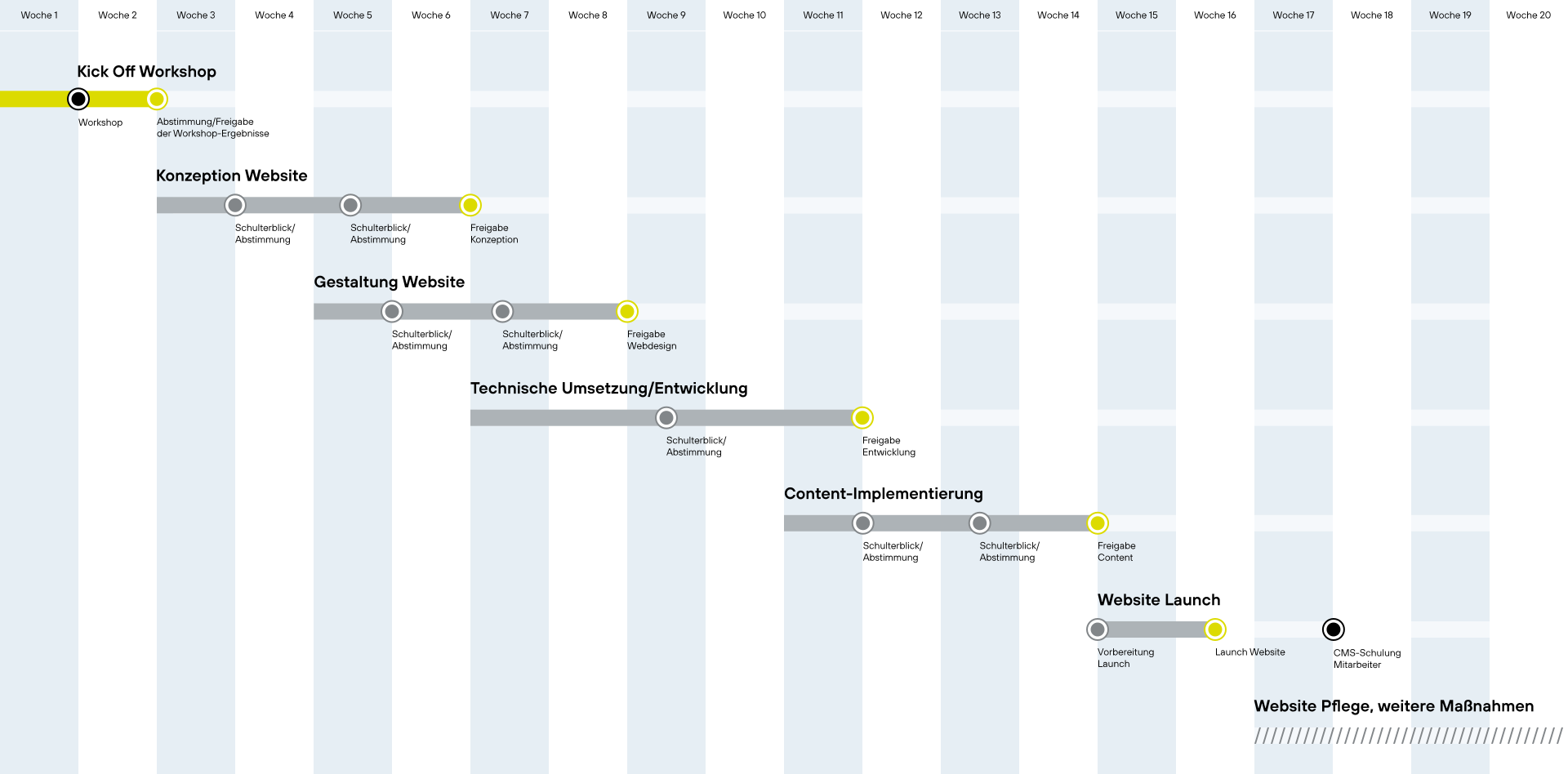
Overview: Timeline of a Website Project
Your Contact for Website Concept Development

More insights on web design:

How much does a website cost?
How much does it cost to have a website professionally designed? What are the components of the cost?
Learn more about the factors that influence the price of a website.

Briefing for Web Design Projects
Are you planning a new website and not sure where to start? Our website briefing will help you answer the basic questions.
Take advantage of our web design briefing.

Web Typography – How to Design Highly Readable Websites
Web typography determines how quickly visitors can grasp content, how professional a website appears, and whether information remains easy to read on all devices.
Learn more about web typography.